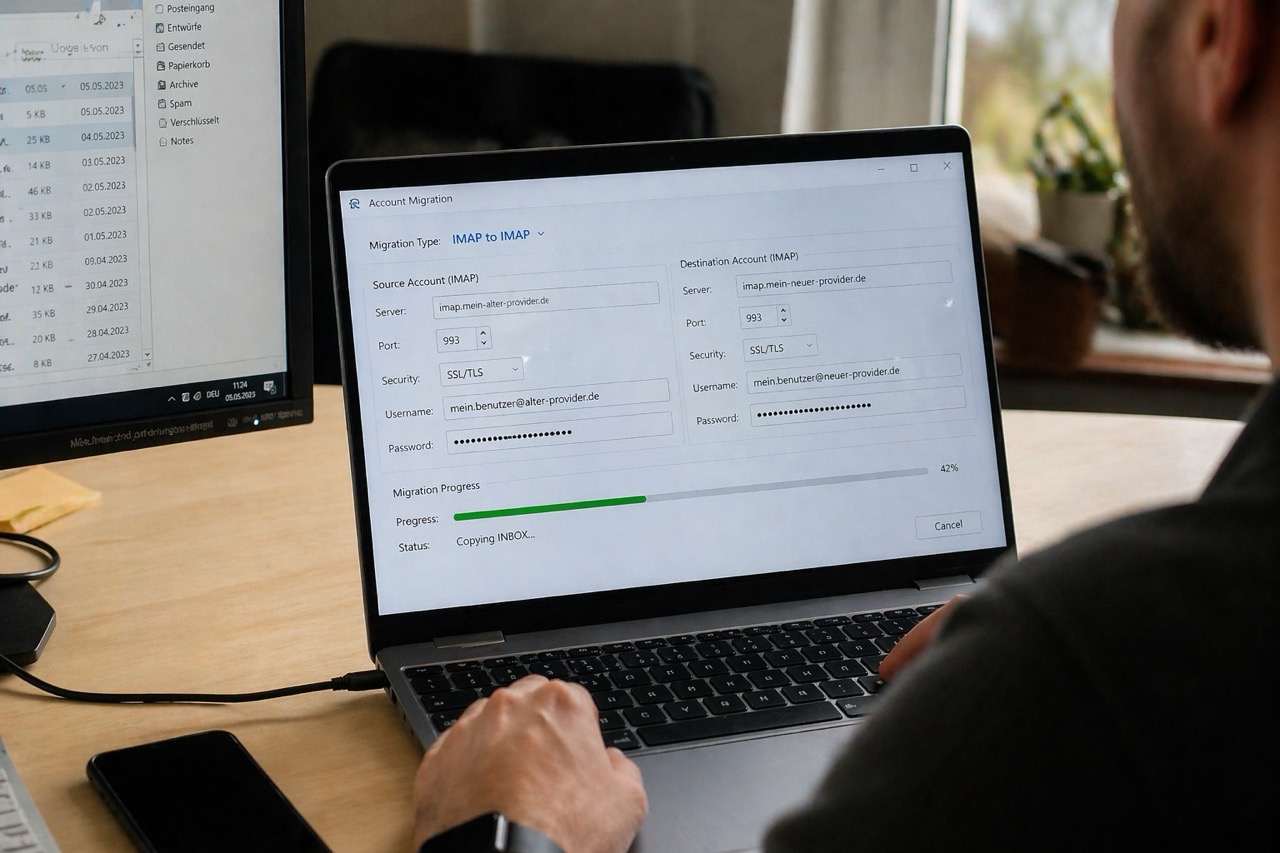
Der Umzug eines E-Mail-Postfachs kann schnell kompliziert werden. Oft geht es nicht nur darum, einzelne Nachrichten zu übertragen, sondern komplette Ordner, Unterordner und bestehende Strukturen sauber in ein neues Postfach zu übernehmen. Genau für diesen Zweck wurde MW IMAP-BOX Copy entwickelt.
Das Tool bietet eine einfache Möglichkeit, E-Mails von einem Quell-Postfach in ein Ziel-Postfach zu kopieren. Besonders praktisch ist dabei die Unterstützung von IMAP, denn damit bleibt die Ordnerstruktur erhalten. Wer seine E-Mails also nicht nur sichern, sondern geordnet migrieren möchte, findet mit diesem Tool eine sehr hilfreiche Lösung.
Die kostenlose Version ist erreichbar unter:https://mertsch-web.com/imap-copy.php
Was ist MW IMAP-BOX Copy?
MW IMAP-BOX Copy ist ein webbasiertes E-Mail-Migrationstool. Es wird auf einem Webserver ausgeführt und im Browser geöffnet. Dadurch ist keine komplizierte lokale Installation notwendig. Das Tool eignet sich besonders für Nutzer, die ein bestehendes E-Mail-Konto auf einen neuen Anbieter oder Server umziehen möchten.
Zum Einsatz kommt es beispielsweise dann, wenn ein Hosting-Anbieter gewechselt wird, wenn ein neuer Mailserver eingerichtet wurde oder wenn bestehende E-Mail-Bestände in ein anderes Postfach übernommen werden sollen. Auch für Agenturen, Administratoren und kleinere Unternehmen ist das Tool interessant, wenn Postfächer schnell und übersichtlich migriert werden müssen.
Warum IMAP die bessere Wahl ist
Bei der E-Mail-Migration spielt das verwendete Protokoll eine entscheidende Rolle. IMAP ist hier klar zu empfehlen, weil damit nicht nur Nachrichten, sondern auch Ordner und Unterordner unterstützt werden. Im Gegensatz dazu ist POP3nur eingeschränkt geeignet, da dort in der Regel keine vollständige Ordnerstruktur übernommen wird.
IMAP und POP3 im Vergleich
| Protokoll | Port ohne SSL | Port mit SSL | Ordner-Support |
|---|---|---|---|
| IMAP (empfohlen) | 143 | 993 | Ja |
| POP3 | 110 | 995 | Nein |
Wer Wert darauf legt, dass Ordner wie „Gesendet“, „Entwürfe“, „Archiv“ oder eigene Unterordner bestehen bleiben, sollte bei der Migration unbedingt IMAP verwenden.
Voraussetzungen für die Nutzung
Damit MW IMAP-BOX Copy funktioniert, müssen einige technische Voraussetzungen erfüllt sein. Auf dem Server wird PHP 7.4 oder höher benötigt. Zusätzlich muss die IMAP-Erweiterung aktiviert sein, da das Tool sonst keine Verbindung zu den E-Mail-Servern herstellen kann.
Außerdem wird ein Webserver wie Apache oder nginx benötigt. Wichtig sind natürlich auch die vollständigen Zugangsdaten für Quell- und Ziel-Postfach. Dazu gehören:
- E-Mail-Adresse
- Passwort
- Serveradresse
- Port
- SSL-Einstellung
Sind diese Informationen vorhanden, kann die Migration vorbereitet werden.
So funktioniert die Migration Schritt für Schritt
Die Bedienung ist klar strukturiert und auch für weniger erfahrene Nutzer nachvollziehbar.
Zunächst wird der Quell-Server eingerichtet. Hier werden Protokoll, Serveradresse, Port, E-Mail-Adresse und Passwort eingegeben. In den meisten Fällen sollte IMAP gewählt werden. Falls der Anbieter eine verschlüsselte Verbindung verlangt, muss zusätzlich SSL aktiviert werden.
Danach kann die Verbindung mit einem Klick auf „Verbindung testen“ geprüft werden. Ist alles korrekt, zeigt das Tool die verfügbaren Ordner des Quell-Postfachs an.
Im nächsten Schritt wird der Ziel-Server eingerichtet. Auch hier werden die Zugangsdaten eingegeben und die Verbindung getestet. Sobald beide Verbindungen funktionieren, können die zu migrierenden Ordner ausgewählt werden.
Anschließend lassen sich verschiedene Migrations-Optionen einstellen, bevor der eigentliche Vorgang mit „Migration starten“ begonnen wird. Je nach Menge der E-Mails und Größe der Ordner kann der Kopiervorgang etwas Zeit in Anspruch nehmen.
Die wichtigsten Migrations-Optionen erklärt
Ein großer Vorteil von MW IMAP-BOX Copy sind die flexiblen Einstellmöglichkeiten. Damit lässt sich die Migration an unterschiedliche Anforderungen anpassen.
| Option | Beschreibung | Empfehlung |
|---|---|---|
| Duplikate nicht übertragen | Bereits vorhandene E-Mails im Ziel werden übersprungen | Aktivieren |
| Vorhandene Duplikate löschen | Entfernt doppelte E-Mails im Ziel-Postfach | Bei Bedarf |
| Leere Ordner nicht erstellen | Leere Ordner werden nicht im Ziel angelegt | Aktivieren |
| Ordnernamen umwandeln | Deutsche Ordnernamen werden auf englische Standardnamen gemappt | Für 1:1-Kopie deaktivieren |
Besonders sinnvoll ist meist die Option, Duplikate nicht zu übertragen, da sie verhindert, dass dieselben Nachrichten mehrfach im Ziel-Postfach landen. Auch die Einstellung, leere Ordner nicht zu erstellen, ist in vielen Fällen hilfreich, weil dadurch unnötige Strukturen vermieden werden.
Die Funktion Ordnernamen umwandeln kann praktisch sein, wenn verschiedene Mailserver unterschiedliche Bezeichnungen für Standardordner verwenden. Wer jedoch eine möglichst exakte 1:1-Kopie erstellen möchte, sollte diese Option deaktivieren.
Ordner verwalten nach der Migration
Nach der eigentlichen Übertragung bietet MW IMAP-BOX Copy mit dem Bereich „Ordner verwalten“ eine nützliche Nachbearbeitung. Dort können alle Ordner des Ziel-Servers angezeigt werden. Außerdem ist es möglich, E-Mails zwischen Ordnern zu verschieben oder nicht mehr benötigte Ordner zu löschen.
Das ist besonders praktisch, wenn nach der Migration noch etwas aufgeräumt oder die neue Struktur optimiert werden soll.
Häufige Probleme und einfache Lösungen
Auch wenn das Tool unkompliziert aufgebaut ist, können bei der Migration Probleme auftreten. Häufig lassen sie sich jedoch schnell lösen.
Verbindung fehlgeschlagen
Wenn keine Verbindung hergestellt werden kann, sollten zunächst Serveradresse, Port, E-Mail-Adresse und Passwort kontrolliert werden. Zusätzlich ist zu prüfen, ob SSL korrekt aktiviert oder deaktiviert wurde. In vielen Fällen liegt der Fehler an einer falschen Kombination von Port und Verschlüsselung.
Timeout bei vielen E-Mails
Bei sehr großen Postfächern oder besonders umfangreichen Ordnern kann ein Timeout auftreten. In solchen Fällen ist es oft sinnvoller, nicht alles auf einmal zu migrieren, sondern die Ordner einzeln zu übertragen.
Fehlende IMAP-Erweiterung
Ist die PHP-IMAP-Erweiterung auf dem Server nicht installiert oder nicht aktiv, funktioniert das Tool nicht. Dann muss php-imap auf dem Server nachinstalliert oder aktiviert werden.
Fehlende Ordnerstruktur
Wenn nach der Migration keine Ordnerstruktur vorhanden ist, wurde häufig versehentlich POP3 statt IMAP verwendet. Für eine vollständige und strukturierte Übertragung sollte immer IMAP genutzt werden.
Für wen ist MW IMAP-BOX Copy geeignet?
Das Tool richtet sich an Privatnutzer, Unternehmen, Agenturen und Administratoren, die E-Mail-Postfächer sicher und strukturiert übertragen möchten. Besonders hilfreich ist es für alle, die keine unnötig komplizierte Software suchen, sondern eine direkt nutzbare Web-Lösung bevorzugen.
Durch die einfache Bedienung eignet sich das Tool sowohl für technisch versierte Anwender als auch für Nutzer, die nur gelegentlich eine Migration durchführen.
Fazit
MW IMAP-BOX Copy ist eine praktische und gut verständliche Lösung für den Umzug von E-Mail-Postfächern. Das Tool überzeugt vor allem durch seine einfache Installation, die klare Bedienung und die Möglichkeit, E-Mails inklusive Ordnerstruktur sauber zu übernehmen.
Wer bei der E-Mail-Migration auf Übersicht, Struktur und eine unkomplizierte Bedienung Wert legt, bekommt hier ein nützliches Werkzeug an die Hand. Besonders die Unterstützung von IMAP macht MW IMAP-BOX Copy zu einer sinnvollen Lösung für geordnete und zuverlässige Postfach-Umzüge.
Kostenlos erreichbar unter:https://mertsch-web.com/imap-copy.php
© 2026 Mertsch-Web – MW IMAP-BOX Copy
English – Blog Version
MW IMAP-BOX Copy: Migrate Emails Easily, Safely, and with Folder Structure Intact
Moving an email account from one provider to another can quickly become complicated. In many cases, users do not just want to transfer single messages, but complete folders, subfolders, and an existing mailbox structure. This is exactly the purpose of MW IMAP-BOX Copy.
The tool provides an easy way to copy emails from a source mailbox to a destination mailbox. Its support for IMAP is especially useful because it helps preserve the original folder structure. So if you want to migrate emails in an organized way instead of simply backing them up, this tool offers a very practical solution.
The free version is available at:https://mertsch-web.com/imap-copy.php
What is MW IMAP-BOX Copy?
MW IMAP-BOX Copy is a web-based email migration tool. It runs on a web server and is accessed through a browser, which means there is no need for a complicated local installation on a computer. The tool is especially useful for users who want to move an existing email account to a new provider or server.
Typical use cases include changing hosting providers, moving to a new mail server, transferring archived emails into another mailbox, or migrating customer mailboxes in a professional environment. It is also a helpful solution for agencies, administrators, and small businesses that need a simple and structured migration process.
Why IMAP is the better choice
The protocol used for email migration plays a major role. IMAP is clearly the recommended option because it supports not only messages, but also folders and subfolders. In contrast, POP3 is only suitable to a limited degree, because it usually does not preserve the full folder structure.
IMAP vs. POP3
| Protocol | Port without SSL | Port with SSL | Folder Support |
|---|---|---|---|
| IMAP (recommended) | 143 | 993 | Yes |
| POP3 | 110 | 995 | No |
Anyone who wants to keep folders such as “Sent”, “Drafts”, “Archive”, or custom subfolders should definitely use IMAP for the migration.
Requirements
To use MW IMAP-BOX Copy, a few technical requirements must be met. The server needs PHP 7.4 or higher. In addition, the IMAP extension must be enabled, otherwise the tool cannot connect to the mail servers.
A web server such as Apache or nginx is also required. Of course, you also need the full login credentials for both the source and destination mailbox. These include:
- email address
- password
- server address
- port
- SSL setting
Once this information is available, the migration can be prepared.
Installation: Fast and simple
The setup process is intentionally straightforward. First, download the file imap-migration.php. Then upload it to your web server. After that, simply open the file in your browser, for example via a URL such as:
Once the tool is loaded, you can begin configuring the mailboxes.
How the migration works step by step
The workflow is clearly structured and easy to understand, even for less experienced users.
First, the source server is configured. Here you enter the protocol, server address, port, email address, and password. In most cases, IMAP should be selected. If the provider requires an encrypted connection, SSL must also be enabled.
After that, the connection can be checked by clicking “Test connection”. If everything is correct, the tool will display the available folders of the source mailbox.
In the next step, the destination server is configured in the same way. Once both connections work, the folders that should be migrated can be selected.
After that, the available migration options can be adjusted before the process is started by clicking “Start migration”. Depending on the number of emails and the size of the folders, the transfer may take some time.
The most important migration options explained
A major benefit of MW IMAP-BOX Copy is its flexible settings. These options help adapt the migration to different needs.
| Option | Description | Recommendation |
|---|---|---|
| Do not transfer duplicates | Emails already موجود in the destination will be skipped | Enable |
| Delete existing duplicates | Removes duplicate emails from the destination mailbox | If needed |
| Do not create empty folders | Empty folders will not be created on the destination side | Enable |
| Convert folder names | Maps German folder names to English standard names | Disable for a true 1:1 copy |
In most cases, it makes sense to enable Do not transfer duplicates, because this prevents the same messages from being copied multiple times. The setting Do not create empty folders is also useful if you want to avoid unnecessary structures in the destination mailbox.
The Convert folder names function can be practical when different mail servers use different labels for standard folders. However, if you want an exact 1:1 copy, this option should remain disabled.
Managing folders after migration
After the actual transfer, MW IMAP-BOX Copy offers a useful post-processing area called “Manage folders”. There, users can display all folders on the destination server, move emails between folders, or delete folders that are no longer needed.
This is especially helpful if the mailbox should be cleaned up or reorganized after the migration.
Common problems and simple solutions
Even though the tool is designed to be easy to use, some issues can occur during migration. Fortunately, the most common ones are usually easy to fix.
Connection failed
If the connection cannot be established, first check the server address, port, email address, and password. Also verify whether SSL has been enabled or disabled correctly. In many cases, the issue is caused by an incorrect combination of port and encryption settings.
Timeout with many emails
If a mailbox or folder is very large, a timeout may occur. In such situations, it is often better to migrate the mailbox folder by folder instead of transferring everything at once.
Missing IMAP extension
If the PHP IMAP extension is not installed or not enabled on the server, the tool will not work. In that case, php-imapmust be installed or activated.
Missing folder structure
If the folder structure is not available after migration, POP3 may have been used by mistake instead of IMAP. For a complete and structured migration, IMAP should always be used.
Who is MW IMAP-BOX Copy suitable for?
The tool is suitable for private users, businesses, agencies, and administrators who want to transfer email accounts safely and in a structured way. It is especially useful for people who do not want overly complicated software, but instead prefer a web-based solution that can be used directly.
Because of its straightforward design, the tool is a good choice for both technically experienced users and people who only need to perform a migration occasionally.
Conclusion
MW IMAP-BOX Copy is a practical and easy-to-understand solution for moving email accounts. The tool stands out thanks to its simple installation, clear workflow, and the ability to migrate emails while preserving the folder structure.
Anyone who values organization, structure, and straightforward usability during email migration will find this tool very helpful. Its IMAP support in particular makes MW IMAP-BOX Copy a strong option for clean and reliable mailbox transfers.
Free access at:https://mertsch-web.com/imap-copy.php
© 2026 Mertsch-Web – MW IMAP-BOX Copy
In der englischen Tabelle ist versehentlich einmal ein fremdes Wort hineingeraten. Die korrigierte Zeile lautet:
Do not transfer duplicates | Emails already existing in the destination will be skipped | Enable
Ich kann dir den Text im nächsten Schritt auch direkt als SEO-Blogartikel mit Meta-Titel, Meta-Beschreibung, Slug und FAQ-Bereich aufbereiten.

Sei der Erste, der das kommentiert
Kommentare sind geschlossen, allerdings sind Trackbacks und Pingbacks möglich.